Now-playing panel
When a song starts, the bot posts a now-playing message in the channel: the song, who asked for it, and buttons to control playback. People can pause, skip or turn the volume up without typing a command.
The buttons
| Button | What it does | Who can press it |
|---|---|---|
| ⏮ Prev | Restarts the song if it's more than 5 seconds in; otherwise plays the previous song again. | DJs, and the person who asked for the song |
| ⏸ Pause / ▶ Resume | Pauses or resumes. | DJs |
| ⏭ Skip | Skips the song. | DJs, and the person who asked for it |
| ⏹ Stop | Stops, clears the queue and leaves. | DJs |
| 🔀 Shuffle | Shuffles the queue. | DJs |
| 🔁 Repeat | Cycles between repeat off, repeat all and repeat one. | DJs |
| ⭐ Favorite | Saves the song to the favorites playlist. |
DJs |
| 🔉 Vol - / 🔊 Vol + | Turns the volume down or up by 10. | DJs |
| ⬇ Download | Saves the song to the yt-dlp library. Only shown when the library is set up. | DJs |
You need to be in the same voice channel as the bot to use any button. A button greys out when it can't do
anything, such as Shuffle with only one song queued. To skip without being a DJ, use /skip, which starts a vote.
Layouts
There are two layouts. Admins pick one per server with /nplayout:
- full (the default): a card with the song, author, length, queue size, volume and requester.
- minimal: a shorter message with just the song, its progress and the volume.
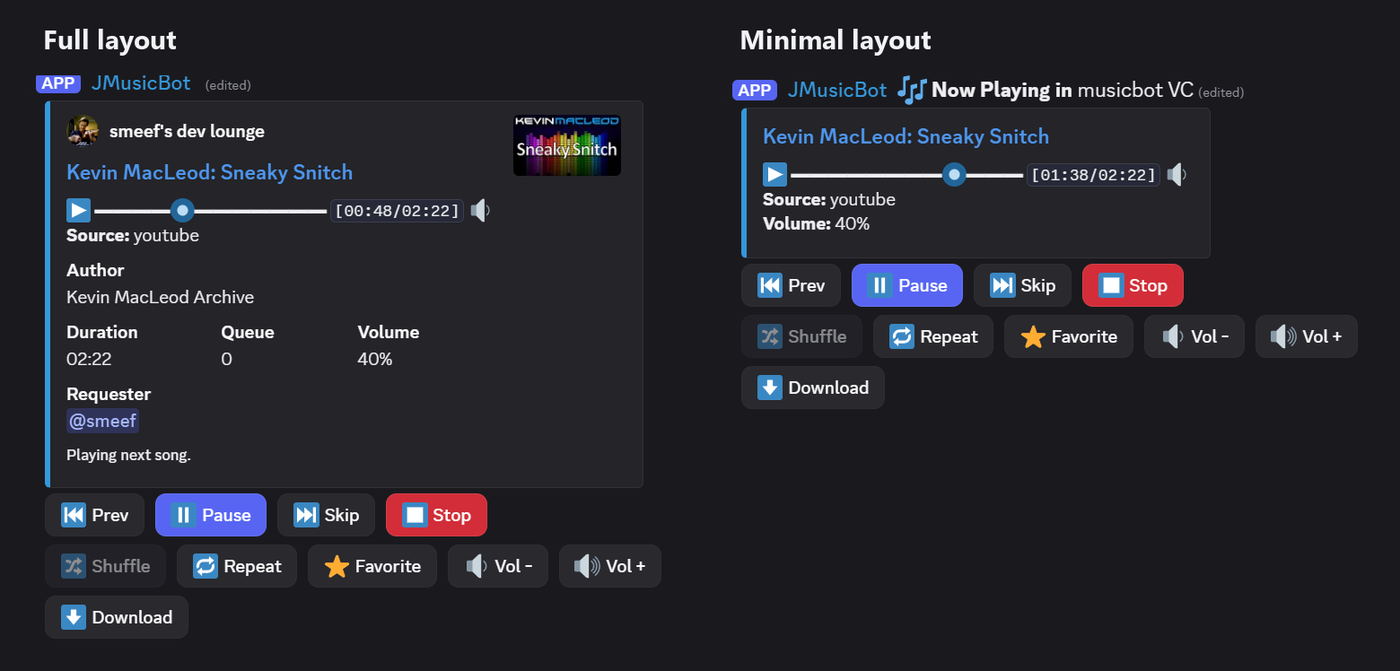
/npbuttons off hides the buttons in a server, for a plain message. inherit in either command goes back to what
config.txt says.
Progress bar
With nowPlaying.showProgressBar = true, the message shows a bar like ▬▬▬▬🔘▬▬▬▬▬▬▬ and the time, and refreshes
every 10 seconds. It's off by default.
How to use it
- It appears on its own when a song starts.
/nowplaying(or/np) posts it again, for example if it has scrolled up./nplayoutand/npbuttonschange it for your server (admins).
Settings
| Setting | Default | What it does |
|---|---|---|
nowPlaying.minimalMessage |
false |
Use the minimal layout everywhere, unless a server overrides it. |
nowPlaying.showButtons |
true |
Show the buttons, unless a server overrides it. |
nowPlaying.showProgressBar |
false |
Show the progress bar and refresh every 10 seconds. |
nowPlaying.images |
false |
Show the song's thumbnail in the full layout. |
See the config.txt reference.
Next: Queue, history and playlists.